The video is finished, but one sentence needs changing. A tutorial needs an English version. A new episode requires a voiceover that must be recorded, processed and exported. AI Clone LS brings several of these tasks into one Mac app, combining voice cloning, speech synthesis in ten languages and a built-in audio Studio.
Its defining approach is local processing. According to the product documentation, an internet connection is required for initial licence activation. Voice cloning, speech synthesis and export then run on the computer rather than through a cloud audio service.
Reusing a voice when the script changes
Creating a voice requires 20 to 60 seconds of clean speech, without music or background noise. Users can start with an existing recording or record inside the app.
The cloned voice can then read new text. For people producing tutorials, podcasts, presentations or client content, this provides a way to generate another reading without personally recording every sentence. The same workflow can be applied to training narration and later script revisions.
The product lists unlimited speech synthesis and exports. That addresses a practical concern for users who need several attempts at a reading: testing different versions without a character allowance being consumed each time.
Ten languages, with a clear distinction between speech and translation
AI Clone LS supports Italian, English, Spanish, French, German, Portuguese, Japanese, Korean, Russian and Chinese. The product presentation describes using a cloned voice across these languages, with controls for tone, speed and emotional expression.
For creators, authors and businesses, this supports the spoken component of content intended for different language audiences. The supplied documentation describes speech generation; it does not establish an automatic workflow that translates a video, adapts its dialogue and synchronises lip movements.
The target-language script therefore remains a separate part of the work. Listening to the generated reading and checking names, technical terms and pronunciation remain part of preparing the content for publication.
Recording and processing without switching apps
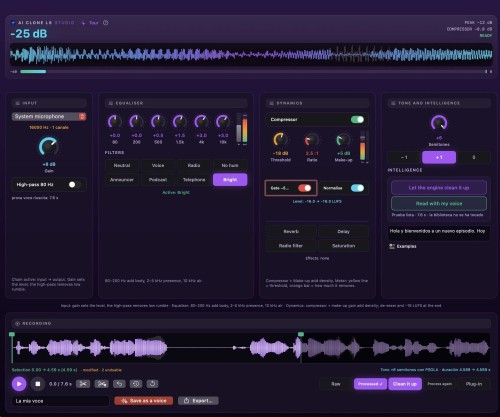
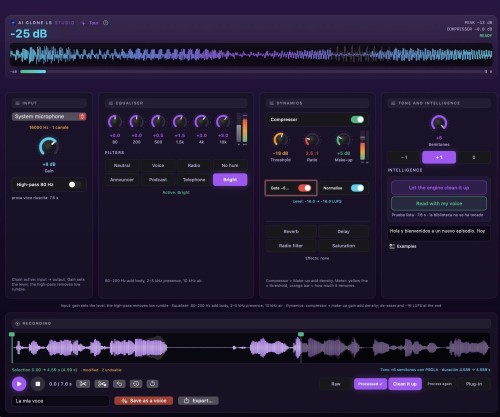
The built-in Studio addresses another part of the workflow: refining a recording before it is used. Input gain, a high-pass filter, a six-band equaliser, a compressor and a gate are available in the same window.
Other tools include reverb, delay, saturation, a radio filter and −16 LUFS normalisation. Eight presets include voice, radio, podcast, telephone and hum-reduction settings, with controls that can be customised.
According to the technical description, PSOLA-based pitch adjustment covers −6 to +6 semitones without changing the recording’s duration. Editing tools allow users to select a start and end point, then keep or remove that section. The result can be exported or saved as a voice within the app.
Keeping working files on a local drive
Local processing is accompanied by configurable storage. Folder settings let users choose where voices, generated audio, the engine and models are kept, including on an external SSD.
The app provides for moving existing files and displays each folder’s storage use. This allows working materials to be kept on an external drive rather than entirely on the Mac’s internal storage. According to the documentation, the licence and application log remain on the computer.
The product also states that it does not collect usage statistics. These are descriptions of how the application operates, not an automatic certification of suitability or regulatory compliance for every business use.
Who it is for, and what it requires
AI Clone LS is aimed at people working with spoken content, including creators, podcasters, audiobook authors and professionals producing material for clients. Its stated licence covers professional and commercial use of generated audio.
The app requires an Apple silicon Mac with an M1 chip or later, running macOS 14 or later. A licence is valid for one computer at a time and can be transferred by deactivating it on the previous Mac. Moving files on an SSD and transferring the licence are separate operations.
The proposition centres on keeping three stages together: creating a voice, generating speech with it and processing audio before export. For users seeking a local workflow, that combination is the main reason to examine the app.
About AI Clone LS
Requirements: an Apple silicon Mac with an M1 chip or later and macOS 14 or later. Recommended voice sample: 20 to 60 seconds of clean speech. Supported languages: Italian, English, Spanish, French, German, Portuguese, Japanese, Korean, Russian and Chinese.
An internet connection is required for initial licence activation. According to the documentation, audio functions subsequently run locally. Product information: AI Clone LS.
Frequently asked questions
- Can I generate new readings without recording my voice every time? That is the intended cloned-voice workflow: create a voice from a sample, then use it to read new text.
- Do recordings need to be uploaded to a server? According to the documentation, voice cloning and speech synthesis run on the Mac without uploading audio to the cloud.
- Does the app automatically translate and dub a video? The supplied material describes voice cloning and speech synthesis in ten languages, but not a complete automatic video-translation and lip-sync workflow.
- Can I use the audio for client work? The stated licence covers professional and commercial use, including client projects.
- Does it work on every Mac? No. It requires an Apple silicon Mac with an M1 chip or later and macOS 14 or later.